 icon in
 O Method FLSA Calculation of D/T Hours
In California, double-time (D/T) hours are paid at one times the regular rate of pay. When there are more than two rates of pay or non-discretionary income, the weighted average method is used for calculation premium pay or HALF pay.
Your organization can set up the system to allow for the 50% premium pay calculation for the D/T pay code, thus including D/T in the weighted average at one times the regular rate, and the DT1 pay code (for straight double-time pay) then calculates at one time the weighted average rate.
Your organization can use a DT1 pay code as the regular double-time pay code using the 1x pay rate, and DTPREM as the premium double pay code, with a rate that is 1x the calculated weighted average rate for the O-type FLSA Rulesets.
| 1. | Set up the DT1 pay code so that the Add to D/T Hours (Threshold) option is selected. |
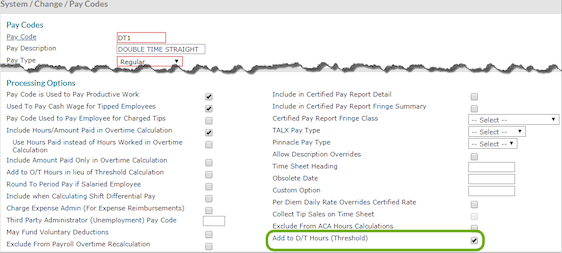
| 2. | Set up the DTPREM pay code as required (Figure 124). |
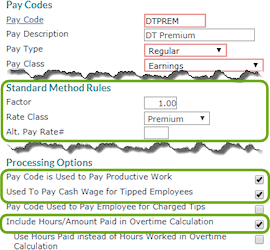
| 3. | Set up an FLSA Ruleset where: |
| • | The Reporting Method is set to (O) Overtime Hours Reported Separately. |
| • | The Premium Pay Code is set to HALF. |
| • | The Double Premium Pay Code is set to DTPREM. |

| 4. | In PrismHR, enter the ruleset ID in the FLSA Ruleset field of the Client Details Payroll tab. |
| 5. | Enter the FLSA Work Week Ends On day. |

| 6. | The next payroll will calculate correctly. |
Note: Note that the payroll’s period end date must coincide with the FLSA Work Week Ends On day.
