Defining W/C Classification Rates
You can use the W/C Classification Rates form to maintain workers’ compensation classification rate information. For example:
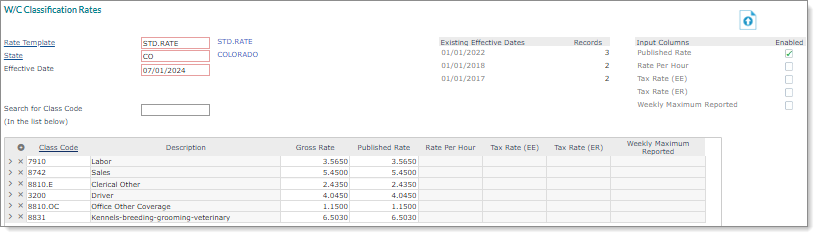
Note: Click the Data Import Tool icon ( ) to import W/C rates at the system level. (See the Payroll Administration Guide for more information about using the Global W/C Classification Rates Import Template option to perform this import.)
To define workers’ compensation classification rate information, do the following:
| 1. | Go to the W/C Classification Rates form and complete the following fields: |
| Field | Description | |||||||||
|---|---|---|---|---|---|---|---|---|---|---|
| Rate Template | Select the Rate Template. | |||||||||
| State | Select the State. | |||||||||
|
Effective Date |
Enter a new Effective Date for this rate template, or select an existing date from the table at the right. |
|||||||||
|
Input Columns/Enabled |
For the Input Columns you need to update, select Enabled. |
|||||||||
|
Search for Class Code |
Use the Search for Class Code field if you want to look for a specific code that is already in the table. |
|||||||||
|
Class Code/Gross Rate/Published Rate |
For each workers’ compensation classification code:
|
Note: The following fields are only used for the state of Washington. Note that W/C is only calculated on the first 160 hours per month in this state.
| Field | Description |
|---|---|
| Gross Rate | Enter the Gross Rate. |
|
Tax Rate (EE) |
Enter the Tax Rate (EE) charged to employees for workers’ compensation. |
| Tax Rate (ER) | Enter the Tax Rate (ER) charged to employers for workers’ compensation. |
| 2. | Click Save. |
