Changing Effective Date for Employee Pay Rate Changes
Use the Pay History Adjustment form to change the effective date of a pay rate change for an employee, or delete the pay rate change entirely.
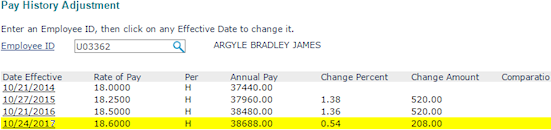
| 1. | Enter the Employee by either entering the name, Social Security Number, or ID to display a pop-up list of matching employee records. You can also click the field label or press Ctrl+Enter with your cursor in this field to open the search window. |
| 2. | Click the Date Effective to change or delete the date. This is the date the pay rate went into effect for the employee. |
| • | To remove the pay rate change, click Delete Date. The pay rate change is removed from the list. (This is only available if there is more than one row.) |
Note: A warning message displays indicating that deleting a pay rate change for the current timesheet may not update the current timesheet. Click Yes to continue.
Important! Deleting a pay rate change that is effective on the first day of the current timesheet does not automatically update the pay rate on that timesheet.
| • | To modify the effective date of the pay rate change, click Change Date. The New Effective Date field displays. |
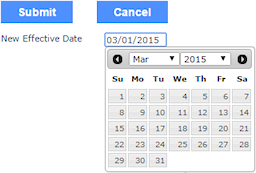
| a. | Enter the New Effective Date. |
| b. | Click Submit. The list updates with the new effective date for the pay rate. |
Note: If you modify the effective date multiple times for the same period, a warning displays stating that this action may affect any Retro Pay calculations that have been paid or are due to the employee.
